Someone found your chicken marsala recipe through Google last Tuesday. They made it that night. Their family loved it. They want to make your pasta next. But now they’re gone, with no way for you to reach them again.
It’s not because they don’t like you, but because nothing caught them on the way out.
That’s the case for building your email list as a food blogger. Most food bloggers know they should do something about it. They just haven’t found a way that fits how they actually work.
Until now…
Why food bloggers put off building their email list
It’s not laziness. It’s that it requires work that has nothing to do with the recipes you’re already making.
Create a lead magnet. Design a landing page. Write a welcome sequence. Figure out pop-up timing so you don’t annoy people. Pick an email platform. Set up the integration. Test it.
That’s a full project, on top of a blog that’s already a full project.
Most list-building tactics also feel pushy. Pop-ups interrupting someone mid-scroll. Overlays blocking the recipe until they enter an email. Readers have seen these tricks and they’ve learned to close them fast.
Your email list plays a different game than Google traffic
Search traffic is valuable. It’s also borrowed.
One algorithm update, one AI Overview eating your clicks, one core update that decides your site structure isn’t what Google wants anymore. Traffic drops overnight. Food bloggers have watched this happen to blogs they admired, and some have watched it happen to their own.
An email list doesn’t care about algorithm updates. It’s yours.
The people on it signed up for you. They gave you their inbox, one of the most direct lines of communication you have with another person online. No algorithm decides whether your next email reaches them. No platform can take that list away.
The easier way in: let your recipe cards collect the emails
The hardest part of growing your email list is that it requires you to make something extra. A free recipe ebook, a meal planning template. Something worth trading an email address for.
That’s a real ask when you’re already spending 8 to 10 hours developing and photographing a single recipe post.
But your readers don’t need extra content to give you their email. They already want something you have: the recipe they’re looking at right now.
Your readers want to save that recipe. Most of them screenshot it and forget where they saw it.
Give them a better option with the Save This Recipe feature from Tasty Recipes.

How Save This Recipe works
Save This Recipe lets your readers instantly email your recipe to themselves (or to food-loving friends and family).
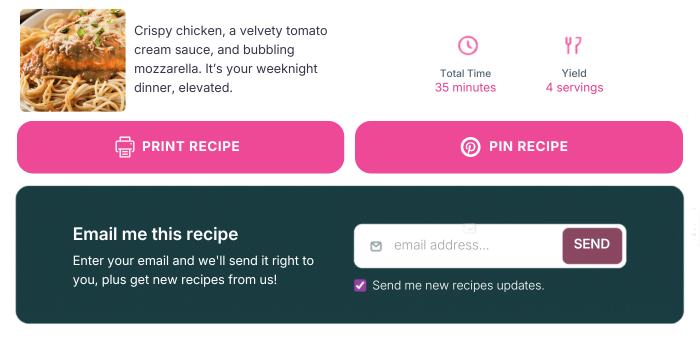
Readers enter their address and get the recipe link sent straight to their inbox. And, if you’re connected with Kit, they’re automatically added to your email list.
Then, once they submit, the form clears out of the way and there’s a clean recipe card. No awkward leftover form sitting there.
What lands in their inbox: the recipe photo and name, and a button straight back to your post. The email comes from your site with your branding, and includes a prompt asking them to come back and leave a star rating after they make it.
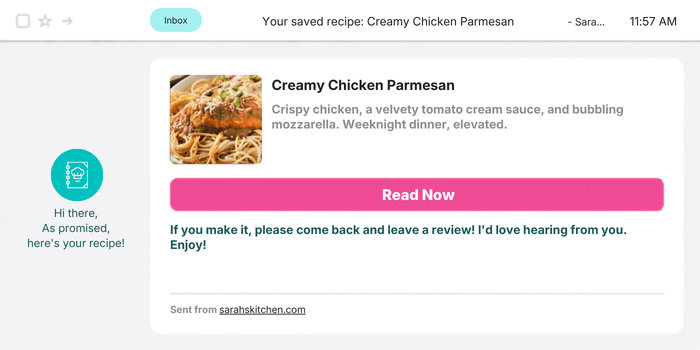
It’s not a newsletter opt-in that requires convincing. It’s the recipe they asked for, delivered to their inbox. They can also choose to subscribe to your email list without you doing anything extra.
Two ways to use the Save This Recipe option
Wherever you’re starting from, Save This Recipe works with Tasty Recipes like this:
Without an email platform: Turn on the feature and connect WP Mail SMTP (a free plugin that makes sure your emails arrive reliably instead of landing in spam). Readers enter their email and get the recipe. You’ve done something genuinely useful for them, and you’ve created a reason for them to come back to your site.
With Kit: Add your Kit API key in your Tasty Recipes settings and the feature does double duty. Everyone who saves a recipe and checks the newsletter box gets added to your Kit list automatically — without a pop-up, without a lead magnet. From there, you can tag them, add them to a welcome sequence, or start sending your regular newsletter.
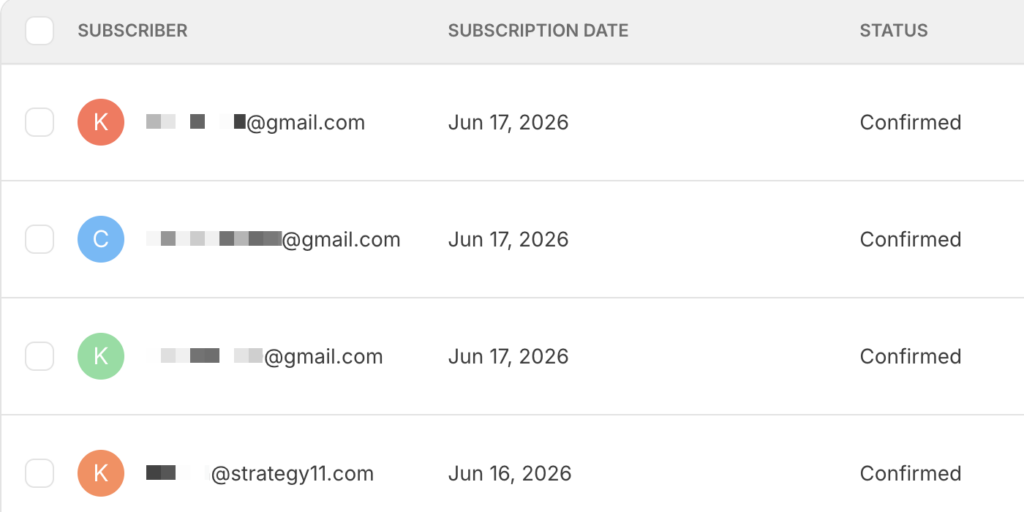
Either way, the form is sitting inside your recipe card the moment you flip the toggle.
Setting up the Save This Recipe feature in Tasty Recipes
In your WordPress dashboard, go to WP Tasty → Tasty Recipes → Settings. Scroll to Save Recipe/Newsletter and toggle it on.
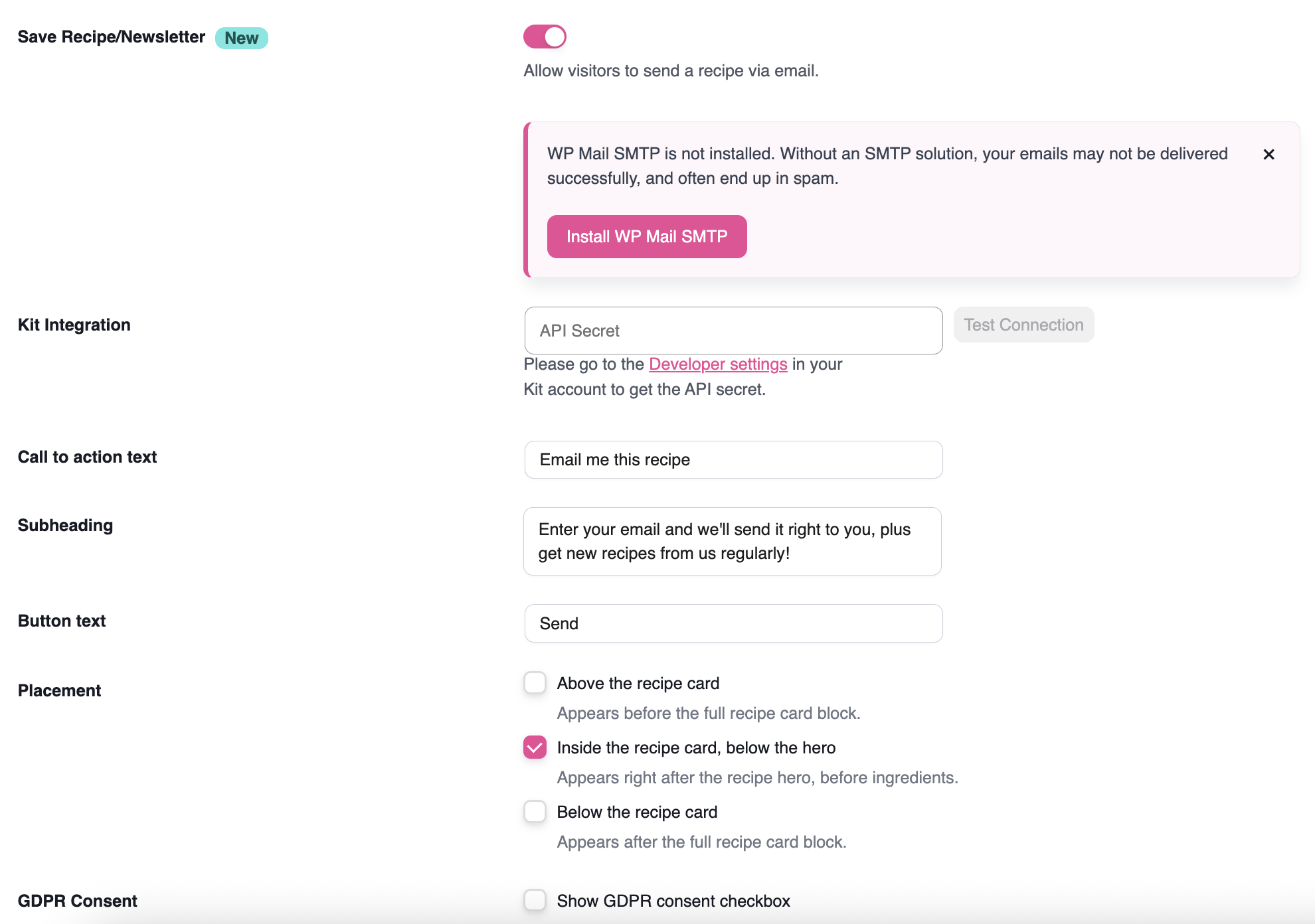
From there, you can change what the form says: the heading, the line below it, and the button. The default is “Email me this recipe.”
You can also choose where the form appears in your recipe card: above it, inside the card below the hero image, or below it.
🍭 Tasty Tip: For emails to land reliably in inboxes rather than spam, install WP Mail SMTP from the WordPress plugin directory. It’s free and takes about five minutes to set up.
Use Kit? Go to your developer settings → API Keys → Add a new key. Paste your Kit API in Tasty Recipes. Then the form will add subscribers to your Kit list when readers check the newsletter opt-in box.
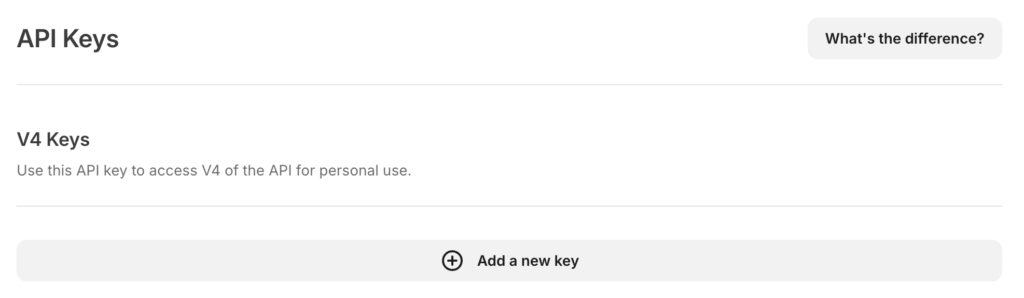
For the full step-by-step, including screenshots of each setting, see the Save This Recipe setup guide in support.
What happens after someone saves a recipe
If you’re using Kit, that reader is now on your list. They already know they like your recipes. Saving one is proof.
From here, your welcome sequence introduces them to more of your content. Your weekly email sends them back to the recipes they’d otherwise miss. You build community of people who found you on their own and chose to stay connected.
That list is something search traffic can’t take from you. It grows on its own, one recipe save at a time, while you’re doing everything else.
Try it risk-free for 14 days. If it’s not the right fit, you get your money back.
FAQs on growing a food blog email list
- How do I add an email opt-in to my WordPress recipe card?
-
With Tasty Recipes, go to WP Tasty → Tasty Recipes → Settings, scroll to Save Recipe/Newsletter, and toggle the feature on. Then, customize the form text and placement.
- Do my readers need to create an account to save a recipe?
-
No. Readers enter their email address and the recipe link gets sent directly to their inbox. One step, no passwords, no sign-up friction.
- Does Save This Recipe work without Kit or an email platform?
-
Yes. If you don’t use Kit, the feature still sends readers the recipe link via email. Connecting Kit is optional. That’s how reader emails to flow into your list automatically.
- Will the emails end up in spam?
-
By default, WordPress sends emails through its built-in mail system, which can land in spam or the Promotions tab. Installing WP Mail SMTP (free) routes your emails through a proper mail service so they arrive reliably. It’s a quick setup and worth doing before you turn the feature on.
- Can I customize what the form says?
-
Yes. From your Tasty Recipes settings, you control the call-to-action text, the subheading, and the button text. And choose where the form appears in your recipe card: above it, inside the card below the hero image, or below it.
- Does Save This Recipe comply with GDPR?
-
Yes. The newsletter checkbox is unchecked by default. Readers have to check the box to subscribe.
- Which Tasty Recipes plan includes Save This Recipe?
-
Save This Recipe is available on all Tasty Recipes paid plans, starting with Basic. It’s not included in Tasty Recipes Lite.
- How do food bloggers grow their email list without a lead magnet?
-
Give readers something they already want. Save This Recipe in Tasty Recipes lets readers save a recipe directly to their inbox from the recipe card — no lead magnet, landing page, or pop-up required. They opt in for the recipe, and you get a subscriber.
