
Your readers want recipes that fit their lives, regardless of the number of people at the table. And that number changes, just like life does.
Cooking for one on a Tuesday. Meal prepping for two. Feeding a crowd on Sunday. When your recipe cards let readers adjust servings with a single tap, you’re meeting them where they are.
This guide covers what recipe scaling does, your options for adding it, and a quick step-by-step walkthrough to get it live on your blog.
What adjustable recipe servings are and why readers want them
Having adjustable servings on your recipes means having scalable recipes. Readers can adjust the serving size of a recipe, and the ingredient quantities update automatically.
Tap ½x? That tablespoon of olive oil now becomes ½.
Tap 2x? Now it’s 2 tablespoons.
The math happens instantly.
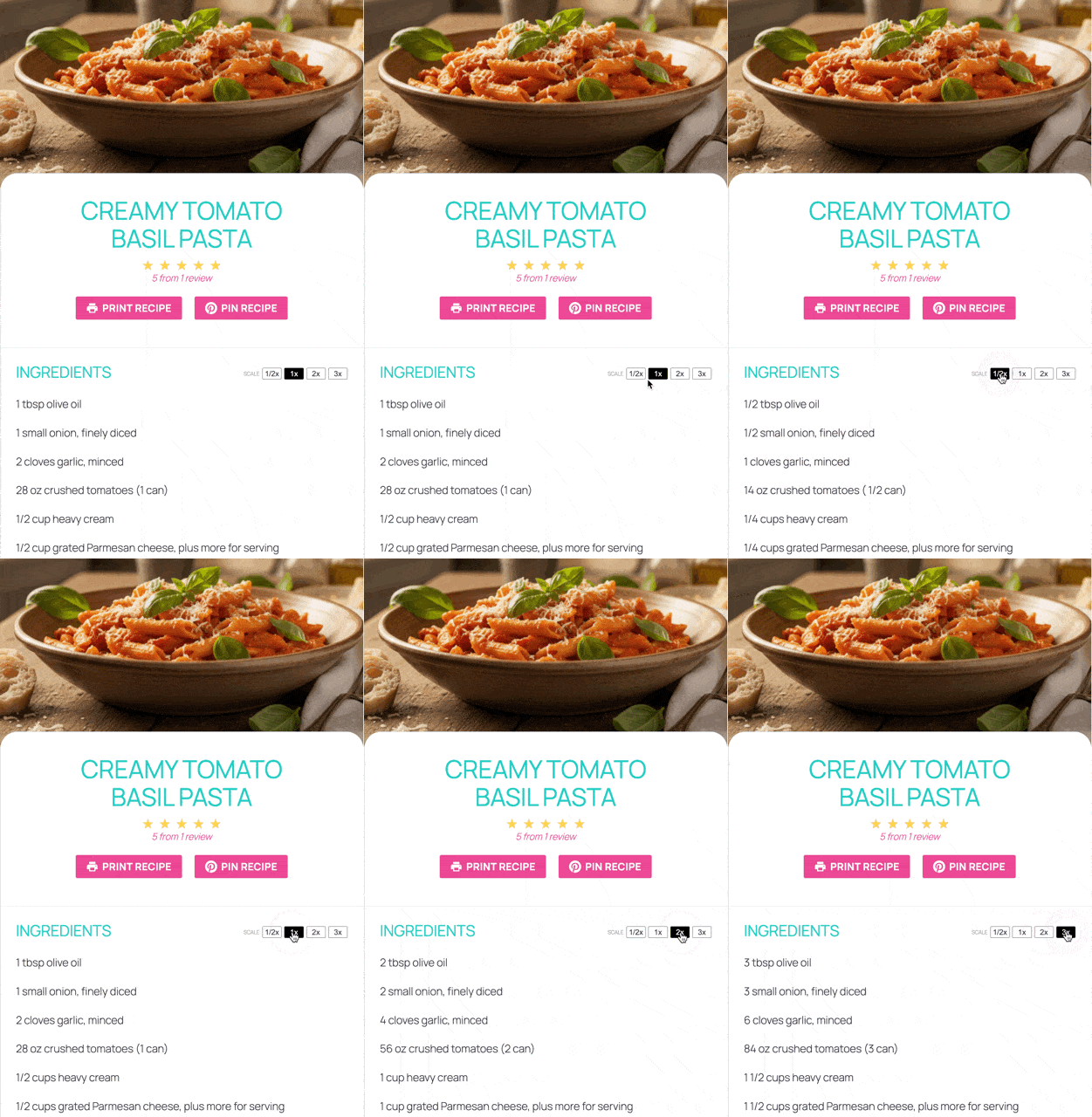
Readers love these easy, flexible moments. It’s what they want.
They’re cooking for smaller households, meal prepping for two, doubling an appetizer for a party. Your readers are looking for recipes that fit their real lives.
When your recipes are easy to adjust, you make things easier for readers and show them you get how they cook.
Your options for adding adjustable servings to your food blog
Third-party JavaScript calculators: Free tools exist that add a scaling widget to your site. But, they don’t integrate with your recipe cards. They sit awkwardly on the page, often break on mobile, and confuse readers who expect scaling to happen inside the recipe itself.
A plugin with built-in recipe scaling that lives inside your recipe card: It’s right where readers expect it. One click, everything adjusts. No extra setup per recipe.
The second option is what top food bloggers use to give their readers adjustable servings. It’s also what we recommend.
What to look for in a recipe scaling feature
Smart fraction handling. “⅓ cup” is helpful. “0.333 cups” is not. Good scaling adjusts to measurements people can use in a kitchen.
Mobile-friendly buttons. Most readers cook from their phones. If the scaling buttons are too tiny, readers will skip or miss them.
SEO stays intact. Scaling shouldn’t break the structured data Google needs to show your recipe in search results. Look for plugins that keep your recipe schema markup in place regardless of serving size.
Flexible options. ½x for cooking for one. 2x and 3x for meal prep or bigger batches.
Lightweight code. Some scaling tools add heavy code that slows your site. The best solutions work bloat-free.
If you’re nodding along to this list, you’re ready to set it up.
How to add adjustable servings with Tasty Recipes
Tasty Recipes is the recipe card plugin used by Sally’s Baking Addiction, Pinch of Yum, and thousands of food bloggers.
Watch how simple it makes recipe scaling for you and your readers.

Step 1: Install and activate Tasty Recipes on your WordPress site. The getting started guide walks you through it if you need help.
Step 2: In your WordPress dashboard, go to WP Tasty → Tasty Recipes → Settings.
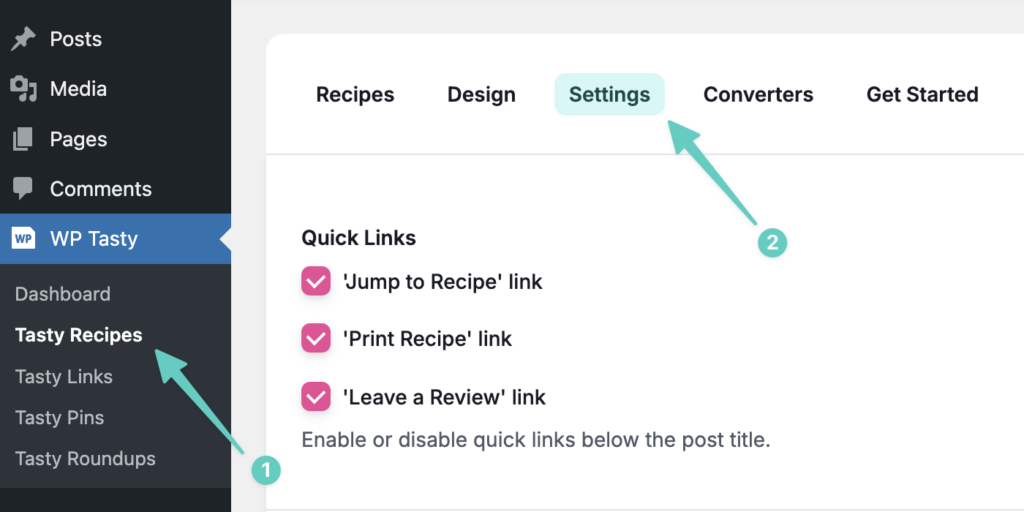
Step 3: Find the Scaling toggle and turn it on.
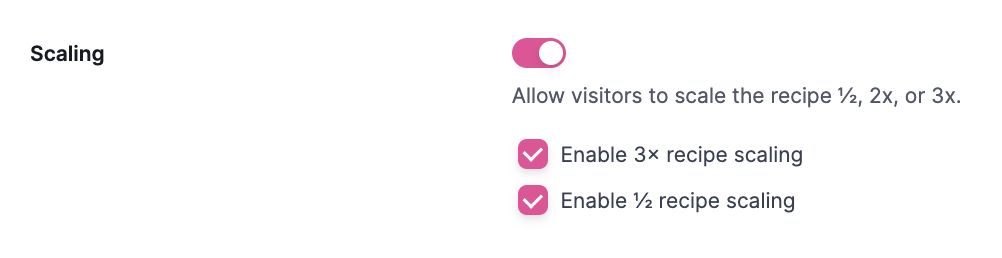
Step 4: Choose your scaling options. You can turn on ½x, 2x, and 3x.
Step 5: Save your changes.
Scaling buttons will show up on every recipe card across your site, every recipe you’ve already published, and every recipe you’ll publish in the future.
A note on the recipes that don’t scale well
Baking is the biggest culprit when it comes to scaling issues.
- Yeast behaves differently in larger batches.
- Leavening agents don’t always scale linearly.
- Oven dynamics change when you double a pan of brownies.
For recipes like these, a quick note is helpful. Something like: “This recipe is best made as written. Scaling may affect rise time or texture.”
Tasty Recipes lets you add notes inside the recipe card. Use this space to give readers a heads-up when scaling isn’t recommended. Tasty Recipes also lets you disable scaling specifically for those recipes. 🚫
How your readers will see adjustable servings on your recipe website
On desktop: Clean scaling buttons are above the ingredient list. The current serving size is highlighted, and clicking a different option updates everything in the blink of an eye.
On mobile: The same buttons, made to work with one finger. No pinching, zooming, or frustration.
The experience: Reader taps ½x → all ingredients adjust → they cook without doing math → they make your recipe.
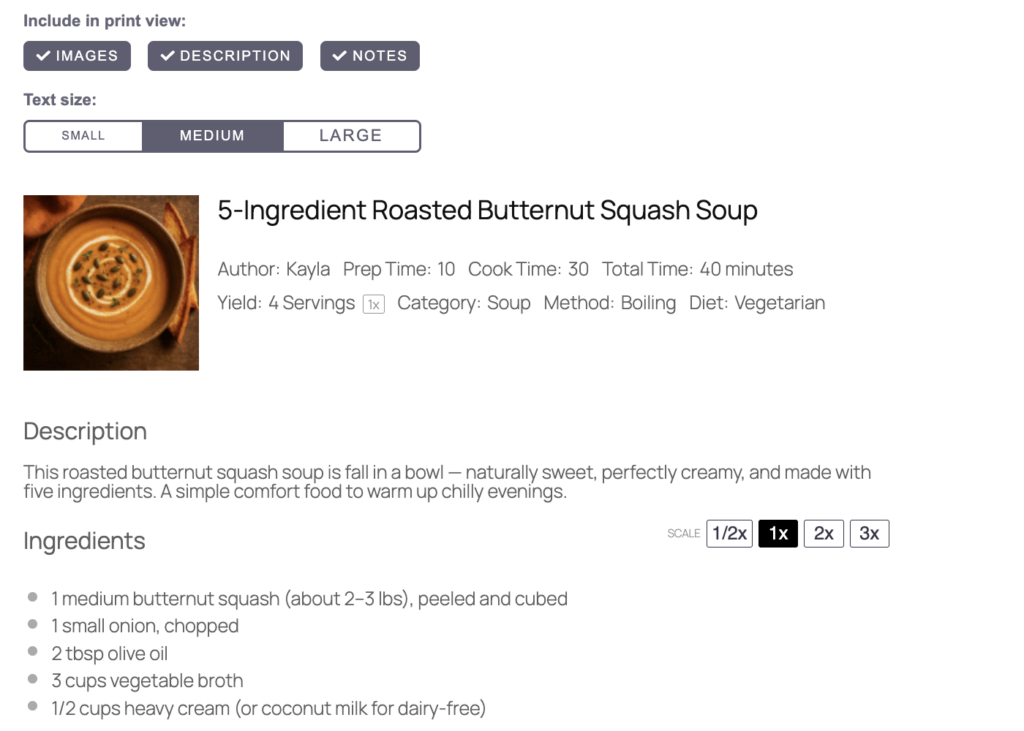
And it pairs beautifully with other reader-friendly features: Cook Mode keeps the screen on while they’re cooking. Print Recipe prints the scaled version.
Recipes that work for any table size
Adding adjustable servings is a one-time setup that benefits every recipe you’ve ever published and every one you’ll publish in the future.
No more mental math in the kitchen. No more “Can I halve this?” comments. Just recipes that fit real households, kitchens, and lives.
Your readers came to your blog because they trust your recipes. Now you can make those recipes work for their world, whether that’s cooking for one, meal prepping for two, or feeding a crowd.

Not sure yet? You can try Tasty Recipes risk-free for 14 days. If it’s not right for your blog, you get a full refund, no questions asked.
Common questions about adjustable servings
- Will recipe scaling affect my SEO?
-
Not if you’re using a plugin like Tasty Recipes. It keeps your recipe schema intact regardless of which serving size readers select. Google sees the information it needs every time.
- Do I need to set up scaling for each recipe individually?
-
Nope. With Tasty Recipes, you flip one switch in settings, and scaling shows automatically on every recipe.
- Can readers adjust servings to any number they want?
-
Tasty Recipes has preset buttons (½x, 1x, 2x, 3x) for simplicity. This keeps things clean and avoids confusing fractions like “1.7x” that nobody can measure.
- What if some of my recipes don’t scale down well?
-
Some recipes genuinely work better at certain quantities. Tasty Recipes lets you add notes or disable recipe scaling on specific recipes.
- Does recipe scaling work when readers print the recipe?
-
Yep! The print preview has scaling options, so readers can tap to adjust servings before they print the exact measurements they want on paper.
- Which plans include recipe scaling?
-
Recipe scaling is included with all paid Tasty Recipes plans (Basic and up).
- Does Tasty Recipes work with my theme?
-
Tasty Recipes works with almost any WordPress theme. And if you run into any issues, there’s a 14-day money-back guarantee — so you can try it risk-free.
- What if I’m already using a different recipe plugin?
-
Check if your current plugin has scaling. If it doesn’t (or if the experience isn’t great), Tasty Recipes makes it easy to convert your existing recipes. Your content isn’t trapped.
