Should Food Bloggers Block AI Crawlers? The Debate + Options

AI crawlers have become one of the most talked-about topics in food blogging, and the conversation is confusing and full of conflicting advice.
Should you block AI crawlers? Will blocking hurt your traffic? Will not blocking mean AI companies use your recipes for free? The community is split, and the loudest voices don’t agree.
This post breaks down both sides of the debate, explains what AI crawlers are, and introduces a new Tasty Recipes setting that puts the decision in your hands!
Expert opinions on blocking AI crawlers from your food blog
The food blogging community has been debating AI crawler blocking since earlier last year. Both positions come from credible, data-backed sources.
Raptive says to block AI crawlers from your website
Raptive recommends blocking AI crawlers, and they’re pretty consistent about it. Their core argument is that AI companies use your content to train their models without your say and without paying you. To them, blocking is the right thing to do until creators are fairly compensated.
Raptive tracked traffic across thousands of creator sites from June 2024 to May 2025. Sites that blocked AI bots saw no significant change in traffic compared to sites that didn’t.
Their April 2026 update argues that there’s strength in numbers, so the more creators block training bots, the more leverage they’ll have to push AI companies toward paying them.
Casey Markee says not to block AI crawlers
Casey, an SEO consultant who has worked with food bloggers since 2015, is on the opposite side of Raptive. When a blogger asked the TopHatRank SEO for Bloggers panel in Q3 2025 whether to follow Raptive’s recommendation, Markee was direct: blocking does nothing for you.
And, on Food Blogger Pro podcast Episode 546, he shared client data from November 2025 through March 2026: ChatGPT referrals up significantly, Gemini up meaningfully, Perplexity up as well.
He believes that letting AI train on your content and showing up in AI-generated answers sends qualified readers your way, and blocking cuts you off from that.
Here’s what the data doesn’t tell us…
Those two datasets are measuring different bots.
The traffic Markee’s clients are seeing from ChatGPT comes from live search bots, not training bots. We all want to be recommended by AI without our content being used to train it for free.
That’s exactly why we built AI Scraper Prevention. This setting only blocks training bots, so his concern about losing ChatGPT referral traffic does not apply here.
This setting does not make the decision for you. But once you know where you stand, it gives you a clean way to act on it. The question to ask yourself: do you want AI companies using your content to train their models, or not?
Your answer determines whether to turn it on or not.
What food bloggers need to know about AI crawlers
Not all AI bots do the same thing, and knowing the difference changes how you think about your options.
Training bots vs. live search bots
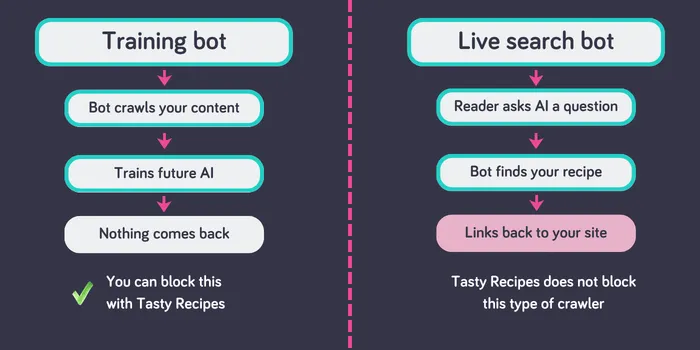
Training bots visit your site to collect content for building AI models. When one finds your banana bread recipe, it downloads the whole thing to help train future AI software. Nothing comes back to you as far as a link, reader, or traffic.
Live search bots work differently. When someone asks an AI assistant a cooking question, a live search bot looks up your current content to help answer it. It links back to your site, which brings you traffic.
These are separate systems. Blocking a training bot has no effect on a live search bot. You can opt out of one without touching the other.
OpenAI’s two bots
OpenAI uses two separate bots that do completely different things.
- GPTBot is the training bot. It downloads your recipes to help build future versions of ChatGPT.
- ChatGPT-User is the live search bot. When someone types a cooking question into ChatGPT, this bot looks up your current content to answer it and links back to your site.
The traffic gains Markee’s clients are seeing from ChatGPT come from ChatGPT-User, not GPTBot. Blocking GPTBot to opt out of training doesn’t touch those referrals.
OpenAI’s bot documentation explains how each works.
What blocking AI scrapers means for your Google rankings
Google AI Overviews aren’t built using training bots.
Google uses its own search bot to generate AI Overviews, and it’s the same one that handles all your regular search results. Blocking GPTBot or ClaudeBot has no effect on your AI Overview presence and no effect on your search rankings.
This is the most common misconception right now. Your rankings are safe.
⭐️ New in Tasty Recipes: AI scraper prevention for your recipes
Every one of your recipes is tested, photographed, and written for real people who cook real food in real kitchens. And now, you can make it clear that your recipes aren’t there to train AI models.
One toggle in Tasty Recipes settings (both Lite and Pro), and it’s decided.

🎚️This switch is off by default. But, when you turn it on, two things happen.
- Your site is updated to block known AI training bots from companies like OpenAI, Anthropic, Google, and others.
- At the same time, a signal is added to every post with a Tasty Recipes recipe card telling AI systems not to use your content or images for training.
This setting only blocks training bots. The live search bots that answer a reader’s real-time question and send traffic back to your site aren’t blocked. If someone asks ChatGPT a question and ChatGPT pulls your shortbread recipe to answer it, that traffic still comes to you.
Your Google rankings stay exactly as they are. You’re opting out of AI training, not AI discovery.
And, if you change your mind, turning the setting off removes the changes on save.
In the interest of transparency: the major AI companies follow these signals. But, there are bad actors that don’t. This setting reaches the rule-followers. But it may not block bad bots who don’t play by the rules.
Our support document, How does AI Scraper Prevention work gives you the techy rundown on how this works on your site.
Whether or not to block AI crawlers from your recipes
We’re not here to tell you which position is right.
Raptive’s data shows no meaningful traffic loss from blocking, and they argue creators deserve compensation before AI trains on their content. Markee’s clients who aren’t blocking are seeing real traffic from AI platforms. Both are true.
The setting exists because you get to decide which matters more to you.
Not on Tasty Recipes yet? Start with Tasty Recipes Lite today.