
The longer you wait to categorize recipes in WordPress, the messier things get.
In this post, I’ll help you fix that. I’ll walk through the four types of recipe categories every food blog needs and show you the simplest way to set them up in WordPress.
Why recipe categories in WordPress get messy
WordPress gives you categories and tags for blog posts. They work fine for general content, but they aren’t made just for your recipes.
There’s not a lot of guidance on:
- What should be a category
- What should be a tag
- How to use either one consistently when publishing recipes
So most food bloggers figure it out on the fly. You publish a recipe, realize you need a category, and make one up. Later, you do it again and call it something slightly different.
Before long, you have “Dinner,” “Main Dishes,” and “Entrees” all in your category list. They mean basically the same thing, but now your recipes are spread across all three.
Tags are often just as inconsistent.
Now you want to create a simple Dinner Recipes page on your recipe index for your readers. Which category do you use? What about the recipes that were never tagged at all?
This happens to almost everyone. And, over time, the mess becomes more and more difficult to untangle.
What good recipe organization looks like
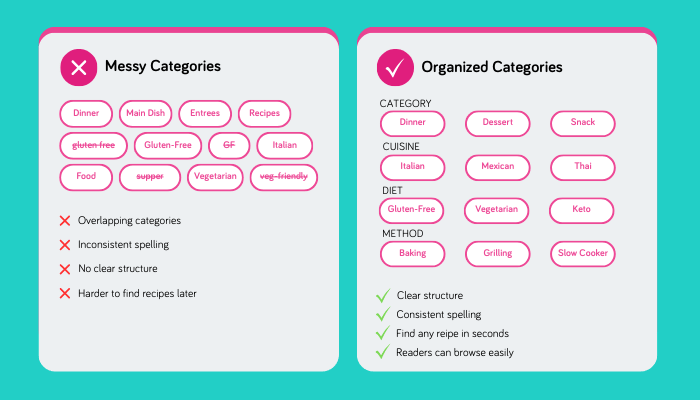
Well-organized recipe categories have a few things in common.
Consistent naming. You use the same label every time. “Gluten-Free” is always “Gluten-Free,” not sometimes “GF” or “Gluten Free.”
Clear distinctions. Categories do not overlap in confusing ways. “Dinner” and “Supper” do not both exist unless they mean different things on your blog.
Multiple layers. Recipes are organized by meal type, cuisine, diet, and cooking method.
Easy to apply. Adding categories takes seconds.
When your categories work like this, finding any recipe takes about 30 seconds. Readers can browse by what matters to them, and you never have to wonder, “Wait, what did I call that last time?”
Four recipe categories every food blog will benefit from
Most bloggers start with one flat list of categories. But recipes don’t fit neatly into a single bucket. (If only!)
A gluten-free Pad Thai recipe isn’t just “Dinner.” It’s also “Thai” and “Gluten-Free.” If you only tag it as “Dinner,” readers looking for “Gluten-Free” recipes will struggle to find it.
That’s why we think the best way to go is tagging your recipe card across a few different categories.
1. Category (Meal Type)
This answers: What meal is this for?
Common options: Breakfast, Lunch, Dinner, Dessert, Snack, Appetizer, Beverage, Side Dish
This is usually the first category bloggers think of. It matches how most readers plan their cooking.
2. Cuisine
This answers: What style of cooking is this?
Common options: American, Italian, Mexican, Chinese, Japanese, Indian, Mediterranean, Thai, Greek, French
Cuisine is especially helpful if you cook a lot from certain food traditions or want readers to browse by flavor profile.
3. Diet
This answers: Does this fit my dietary needs?
Common options: Vegetarian, Vegan, Gluten-Free, Dairy-Free, Keto, Paleo, Low-Carb, Pescatarian
Dietary tags matter. Many readers search specifically for recipes that match their restrictions, and they’ll leave your site if they can’t find them easily.
4. Cooking Method
This answers: How do I make this?
Common options: Baking, Grilling, Slow Cooking, Pressure Cooking, Stovetop, Air Fryer, No-Cook, Steaming
So, the next time you fill out a recipe card, instead of creating one mega-category called “Easy Gluten-Free Instant Pot Dinners,” you tag a recipe with Dinner + Gluten-Free + Pressure Cooking (or Instant Pot).
It’s cleaner, more flexible, and readers can find it in three different ways.
Setting up recipe categories in WordPress
You have a few options for adding these categories to your food blog. Here’s what each way looks like.
WordPress categories and tags
You can create parent categories for each dimension (Meal Type, Cuisine, Diet, Cooking Method) and add child categories for each option. Then manually tag every recipe post.
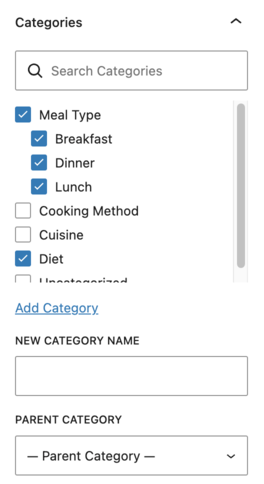
This works, but it takes discipline. You have to remember which categories exist, spell them consistently, and apply them every time you publish. Over time, it’s easy to slip back into messy habits.
Recipe taxonomies and keys in Tasty Recipes
If you want recipe-specific organization without having to think too hard about it, Tasty Recipes is the simplest option.

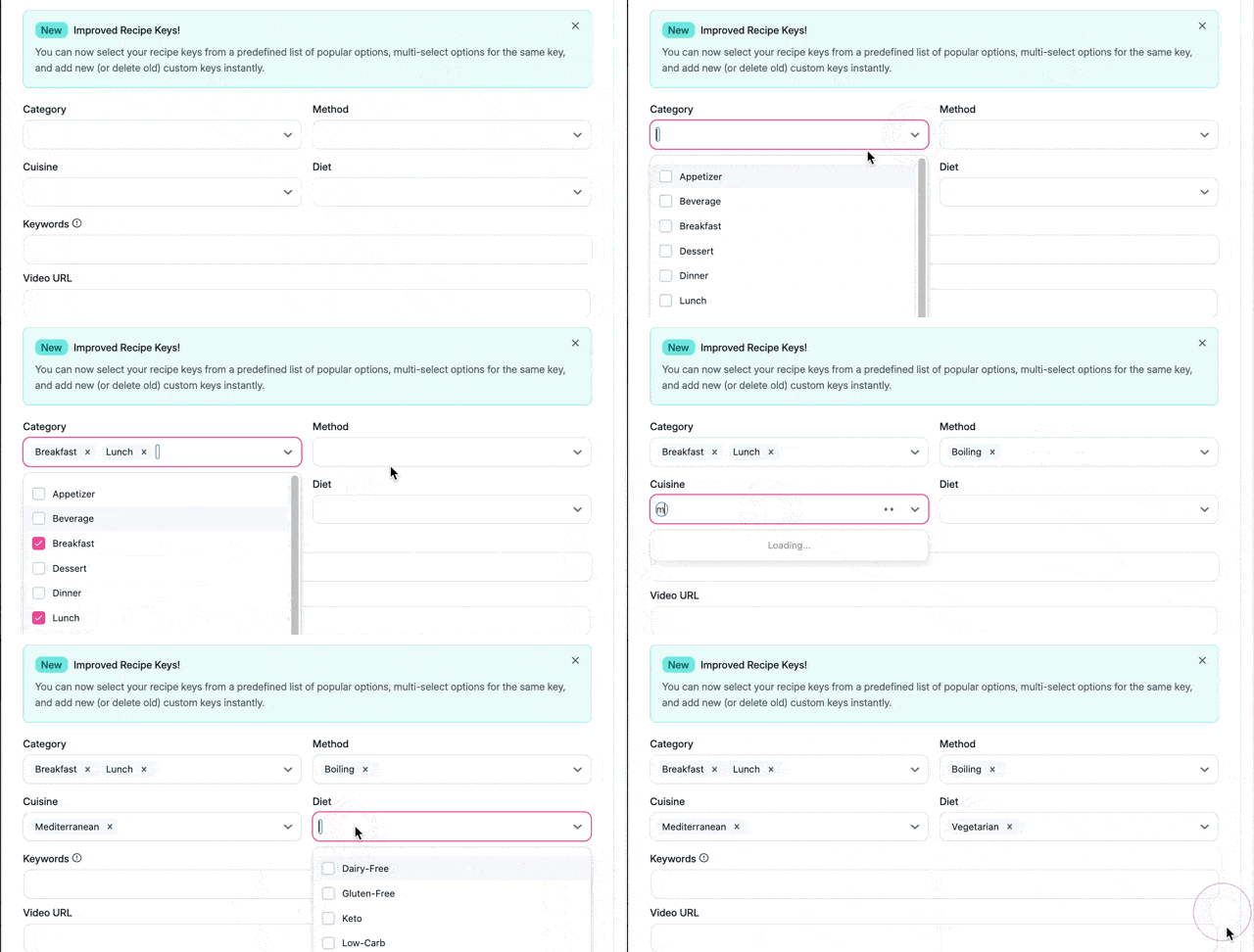
Tasty Recipes has recipe taxonomies with four dropdown menus: Category, Cuisine, Cooking Method, and Diet. Each dropdown comes pre-loaded with recipe keys. Just click, pick, and you’re done.
Need something that’s not in the list? Add your own custom recipe key once, and it’ll show up in the dropdown from then on.
Every taxonomy you pick also becomes a clickable link on your recipe card. Then, readers can tap “Baking” on your banana bread recipe and instantly browse every baking recipe on your site.
Recipe taxonomies are included in Tasty Recipes Lite (free) and all paid plans.
Food blog category audit: Is your recipe organization working?
Take 60 seconds to check:
- Do you have clear, non-overlapping meal type categories?
- Can readers filter by dietary needs (gluten-free, vegetarian, etc.)?
- Are you using consistent naming across all your recipes?
- Can you find any recipe in your library in under 30 seconds?
- Do your categories match what readers actually search for?
If you checked fewer than three, it’s time to revisit your category structure.
Organize your recipes now, not later
Good recipe organization isn’t about having the most categories. You need the right ones, used consistently.
Four taxonomies — Category, Cuisine, Diet, and Cooking Method — cover most use cases without overcomplicating things. And when you use a WordPress recipe plugin that builds these in for you, staying organized stops being something you have to think about.
Ready to organize your recipes without the stress of trying to untangle them all later?
