
Open Google and search “lemon cake recipe with icing.” You’ll see a recipe carousel with food bloggers’ recipes shown with photos, star ratings, and cook time. All before anyone clicks. These are a type of recipe rich result.
Search “turkey meatballs recipe.” It’s the same story, but different websites (maybe) for a different dish.
Those food blogs showing up aren’t random though. They earned their spots, and the way they got there is more specific than most people think. In this article, we’ll break down what’s happening in those results, why the same sites often show up in related searches, and what it takes to get your recipes there too.
- Recipe rich results in the recipe carousel
- Individual recipe rich results
- AI Overviews and what they mean for recipe bloggers
- Google AI Mode: a totally different beast
- Why the same food blogs keep showing up
- How to work your way into the recipe rich snippet results
- When your recipe still isn't showing up
- Recipe rich result FAQs
🍭 Tasty Tip on terminology: You’ll see “recipe rich snippets” and “recipe rich results” used interchangeably. “Rich snippet” is an older term and what lots of food bloggers search for. “Rich result” is what Google calls it now.
Recipe rich results in the recipe carousel
The recipe carousel is that strip of recipe cards that shows up at the top of Google results when someone searches for a dish. Each card has a photo, the blog name, star ratings, cook time, and a peek at the ingredients.
That strip is prime real estate. It sits above most of the page, and your photo and ratings do the selling before a reader reads a single word.
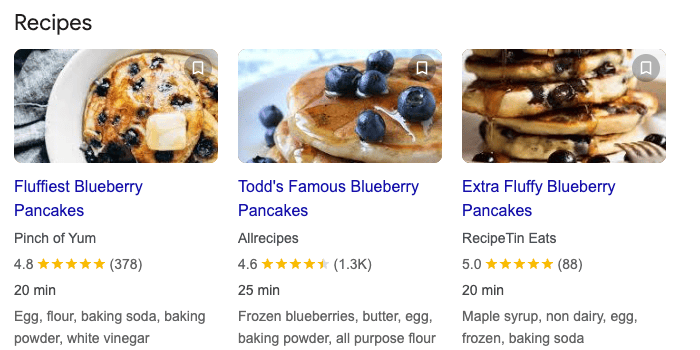
Getting into the carousel takes a few things working together: a complete recipe card, structured data (aka, recipe schema) that gives Google your recipe’s details, quality images, and reader ratings.
Individual recipe rich results
Below the carousel (or in place of it, depending on the search) you’ll see individual rich results.
These look like regular Google search results, but with extras: a star rating, cook time, a small thumbnail photo, and ingredients.
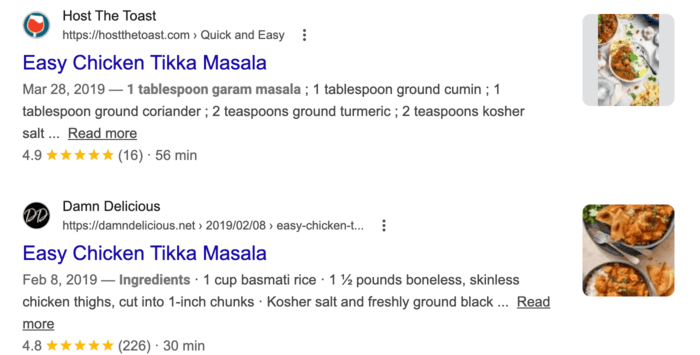
They’re not as flashy as the carousel, but catch your eye more than a plain blue link. Readers have more to look at, more reason to click, and Google is still reading your recipe data correctly.
Both the carousel and individual recipe rich results are built on the same thing: a properly set up recipe card with all the fields filled out.
AI Overviews and what they mean for recipe bloggers
Google’s AI Overviews are those AI-generated summary boxes that show up at the top of some search results. When AI Overviews first rolled out, food bloggers felt the impact hard.
A recent Food Blogger Pro podcast episode highlighted a graphite.io study finding that AI Overviews now appear in roughly 30% of searches, so it’s not every search and not even most.
Search “fluffy blueberry pancake recipe” in Google and you’ll typically see the carousel, videos, and individual rich results instead of an AI-generated recipe. AI Overviews now tend to show up for broader cooking questions or searches where someone wants technique guidance like:
- What’s the best way to cook pancakes?
- How do I keep meatballs from falling apart?
That’s good news for food bloggers. The carousel and individual recipe rich results are still where the action is for specific recipe searches.
Google AI Mode: a totally different beast
Google AI Mode is a fully separate interface from traditional search.
When AI Mode launched, it was generating what food bloggers called “Frankenstein recipes” (AI-synthesized content combined from multiple blogger sources), served as a complete recipe without sending traffic back to the original creators. The backlash was real.
In March 2026, Google updated AI Mode specifically to fix this. Search Engine Land reported Google’s Robby Stein confirming the change: “We’ve heard feedback on recipe results in AI Mode, and we’re making updates to better connect people with recipe creators on the web.”
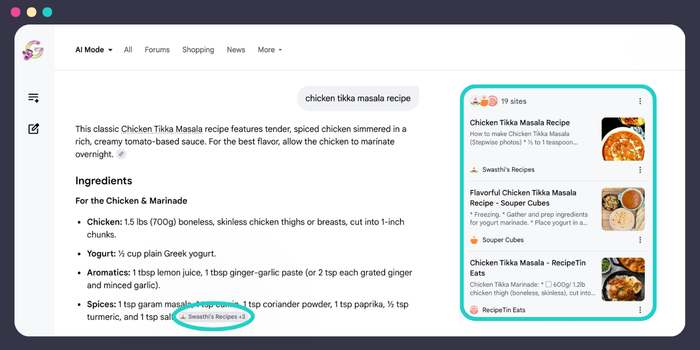
Search for a recipe there and Google pulls content from food bloggers, credits each source, and shows them as clickable attribution chips. Tap a chip and the original blog post opens in a split-view tab right inside the interface.
This is different from an AI Overview: An Overview summarizes and links. AI Mode goes further and extracts.
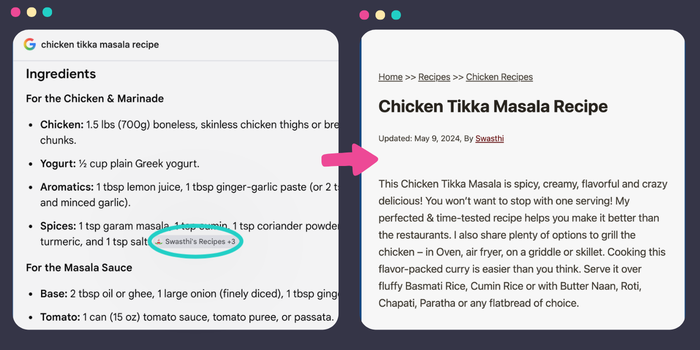
You can’t optimize specifically for AI Mode the way you’d target a keyword. What gets your recipes pulled in is the same stuff that earns carousel placement: complete recipe data, clear and useful content, and a site with a track record.
Getting the foundation right puts you in the running for both.
Why the same food blogs keep showing up
Search “chocolate chip cookie recipe” right now. Sally’s Baking Addiction and Pinch of Yum are probably in the carousel. Search again in six months. They’ll probably still be there.
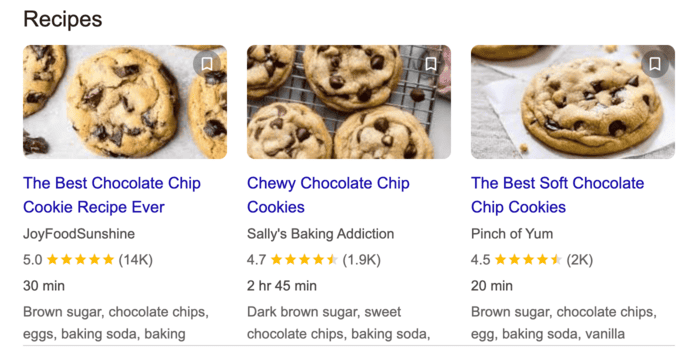
That’s not luck. That’s years of readers finding the recipe, making the cookies, and leaving a star rating. Google notices when that keeps happening.
The blogs that show up consistently aren’t there because of one thing. They’re there because of a few things that build on each other over time.
A complete recipe card. A recipe card is what gives Google the structured information it needs to display a rich result — your recipe name, ingredients, cook time, servings, nutrition info, and more. Recipe cards do a lot more than help SEO, but for search visibility, they’re the foundation.

(If you’re not sure how to add recipe cards to your posts, this walkthrough covers the full setup.)
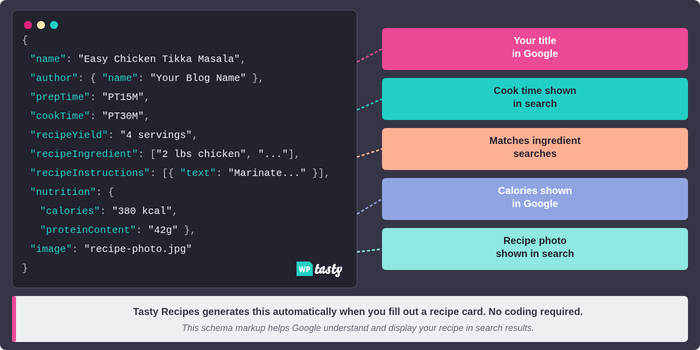
Recipe schema. When you fill out a recipe card with a recipe plugin like Tasty Recipes, it automatically generates the structured code (called schema). That code tells Google exactly what your recipe contains. Without it, Google can’t read your recipe data and your post isn’t eligible for rich results.
(Our recipe schema guide has the full breakdown if you want to go deeper on this.)
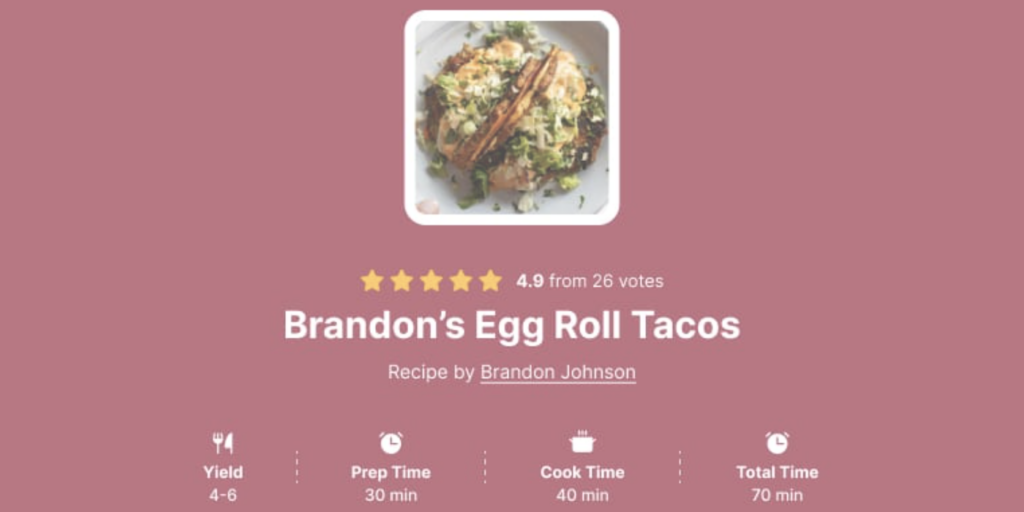
Star ratings, and enough of them. One five-star rating and 500 five-star ratings tell Google very different things. Ratings are a trust signal, and volume matters. Enabling reader ratings means every recipe you publish is quietly accumulating that signal while you’re busy doing everything else.
Images in the right formats. Photos are the focus in the recipe carousel. Google favors recipe images in 1:1, 4:3, and 16:9 aspect ratios. Having all three gives you the best coverage across different placements and surfaces.
Content that matches what people are searching. “Easy chicken soup” and “chicken soup from scratch” are different searches. A recipe written specifically for one of those key phrases will outperform a generic recipe every time, even with identical schema.
A site with a history. The blogs that dominate search have years of publishing, crawling, and reader engagement behind them. Newer blogs can absolutely earn rich results. The signals that matter just take time to build. Starting now means they’re building while you work.
How to work your way into the recipe rich snippet results
You can’t whip up two years of ratings overnight. But you can set up everything that makes recipe rich results possible, and start building up from there.
Get your recipe schema in place. We keep our plugin’s recipe SEO up-to-date. That way, the freshest schema is on every recipe card, automatically, in the format Google expects. Fill out every field when you publish: nutrition info, cook time, keywords, category, cuisine. Every blank field is a gap in your eligibility.
⭐️ Turn on reader ratings. Tasty Recipes makes it easy for readers to leave star ratings on your recipe card. Flip them on so that every rating that comes in after that is a signal building.
Incorporate photos of different sizes. Landscape (16:9), crop to square (1:1) and 4:3 as alternates. Attach all three when you fill out the recipe card. Google has what it needs no matter which format it’s displaying.
Test your setup with Google’s Rich Results Test. After publishing, drop your URL into Google’s Rich Results Test. It shows exactly what Google can read on your page and flags any errors that would disqualify you from rich results. Fix errors before anything else and then take care of the warnings.
Request indexing after publishing. Recipe rich results don’t update in real time. After publishing or updating a recipe card, request indexing in Google Search Console to nudge a recrawl.
For the full recipe SEO picture beyond recipe rich results, our recipe SEO guide for food bloggers covers keywords, internal linking, and everything in between.
When your recipe still isn’t showing up
If your recipe card is live, the Rich Results Test is passing, and you’re still not seeing a rich result in search, here’s what to check:
- Google hasn’t recrawled yet. This is the most common reason. Request indexing in Search Console.
- The schema had errors when it was first indexed. Google may have cached a broken version of the page. Fix the errors, then request reindexing.
- A required field was empty at indexing. Name, image, and author are required. Missing any one of them makes the recipe ineligible because the carousel specifically needs an image.
- The blog is on the newer side. Rich results favor sites with established signals. Schema creates the eligibility. Authority and engagement determine how quickly Google acts on it.
For more troubleshooting support, our articles How To Use the Google Rich Results Test and Why Are My Google Rich Results Missing cover every common hiccup.
Recipe rich result FAQs
- What’s the difference between the recipe carousel and a recipe rich result?
-
The carousel is that strip of photo cards at the very top of results with multiple recipes side by side. A rich result is an individual listing lower on the page, enhanced with star ratings, cook time, and a thumbnail. Both need complete recipe data.
- How do I get into Google’s recipe carousel?
-
Start with a complete recipe card. Fill out every field, add a good photo in multiple aspect ratios (1:1, 4:3, and 16:9), and turn on reader ratings. From there, Google looks at how relevant your recipe is to the search and how much it trusts your site. The foundation is what you control. The rest builds over time.
- Does recipe schema markup guarantee recipe rich results?
-
Nope. Schema gets you eligible, not guaranteed. Google still decides. But a complete, correctly set up recipe card is the only path there, so it’s the right place to start. Google’s eligibility guidelines are public if you want the full list.
- Do I need a lot of ratings to get into the carousel?
-
More than you might expect. Google uses rating volume as a trust signal, so 200 ratings carries more weight than 2. Turn on reader ratings and let them accumulate. They build slowly and then compound once your traffic picks up.
- How long does it take for a rich result to appear after publishing?
-
A few days to a few weeks for established sites, longer for newer ones. Request indexing in Google Search Console after publishing to nudge Google to check sooner. If nothing shows up right away, that’s normal, not broken.
- Can newer food blogs earn rich results?
-
Yes. Any blog can have valid schema from day one. That part doesn’t require history. What takes time is the ratings and site authority that push you into the carousel on competitive searches. Going after more specific (but relevant), lower-competition searches early is a solid way to start earning rich results while you build.
- What is Google AI Mode and how is it different from an AI Overview?
-
An AI Overview is a summary box inside regular Google results that cites sources. AI Mode is a whole separate interface. Google builds a full AI answer, and for recipes, that means pulling your actual ingredients and instructions directly into the page. Both can feature your recipes. Neither has replaced the traditional carousel for most food blog traffic right now.
- Is there a free version I can start with?
-
Yep. Tasty Recipes Lite is free and gets you recipe cards with schema. If you want nutrition info, Cook Mode, and ingredient scaling, those are in the paid version. But Lite is a real starting point.
